

Home · Agents

How it works: the Sprite Manager

For turning a game's art needs into sprites that fit the game exactly, measured before anyone has to judge them by eye.

Philosophy

  • Every sprite grows from one approved image. A new frame or outfit is generated from the last approved one, never from scratch, so nothing drifts in size, style or proportion.
  • Measure, then look. Feet, head height, sword length, soft edges, seams and colour are checked in code before a person spends attention on them. A number flags a problem; a mock-up in the game's own layout decides it.
  • One design, one image, one prompt. Each prompt asks for exactly one picture and says what's attached to it, so there's never a guess about which image was meant.
  • Nothing handed over is thrown away. Rejected images are archived and may be reused; an upload missing a detail is held and asked about, not refused.
  • Review against the brief, not by taste. Every upload is inspected against the requirements it was written from, by the Art Director who wrote them, with the measurements alongside.

The workflow

the Sprite Manager: the workflow as a flowchart1A game needs arta requirement arrives from a game agent or the Art Director.game agent2Turn it into requestsone request per file, with its canvas, its reference image andanything it must wait for.Sprite Manager3Write the prompta numbered first line ("Sprite 05 — wall_top"), the attachments inorder, then the brief and the rules.Sprite Manager4Generate the imagecopy the prompt and its attachments into the image generator.owner5Upload itdrop it on the request's card; it's fitted to its canvas and cleanedautomatically.↳ No generator named → kept and held until it's namedowner6Check it in codesize, transparency, seams, colour, and for walk frames the feet,height and sword.Sprite Manager7Send it for reviewpaths, checks and previews go to the Art Director, with the ProjectManager copied.Sprite Manager8Give the verdictinspect it against the brief: pass, or what to change.Art Director9Accept itone click on the passing image.owner10Deliver itthe file, its untouched original and a ready-to-paste provenance rowgo to the game agent, which wires it in.Sprite ManagerFailsthe Sprite Manager: the workflow as a flowchart1A game needs arta requirement arrives from a game agentor the Art Director.game agent2Turn it intorequestsone request per file, with its canvas,its reference image and anything it mustwait for.Sprite Manager3Write the prompta numbered first line ("Sprite 05 —wall_top"), the attachments in order,then the brief and the rules.Sprite Manager4Generate the imagecopy the prompt and its attachments intothe image generator.owner5Upload itdrop it on the request's card; it'sfitted to its canvas and cleanedautomatically.↳ No generator named → kept and helduntil it's namedowner6Check it in codesize, transparency, seams, colour, andfor walk frames the feet, height andsword.Sprite Manager7Send it forreviewpaths, checks and previews go to the ArtDirector, with the Project Managercopied.Sprite Manager8Give the verdictinspect it against the brief: pass, orwhat to change.↩ Fails → step 4Art Director9Accept itone click on the passing image.owner10Deliver itthe file, its untouched original and aready-to-paste provenance row go to thegame agent, which wires it in.Sprite Manager

What it owns

  • The sprite pipeline: request → generate → upload → check → review → accept → deliver.
  • The gallery: every prompt ready to copy, a drop zone per request, and the checks beside each image.
  • The sprite measurement tools and the technical standards (canvas, transparency, frame order, naming).
  • Each game's asset table: which files it needs, at what size, and in what order.

What it hands off

  • Art Director: writes the briefs the prompts are built from, and inspects every upload against them.
  • Game agents (GENERAL!, CHEF!): send requirements in; take approved sprites out and wire them into their own game. The Sprite Manager never writes into a game's folder.
  • Project Manager: process, shared code and relayed decisions; copied on every review.

Guardrails

  • Never automates Accept or Reject: that click stays a person's.
  • Never writes into a game's folder; games copy what they're delivered.
  • Never flips a sprite to make another direction: every facing is drawn.
  • Never deletes a rejected image; it's archived, and every rejection's reason is kept.
  • Never names an image generator in a prompt, and always records which one made each image.

At work
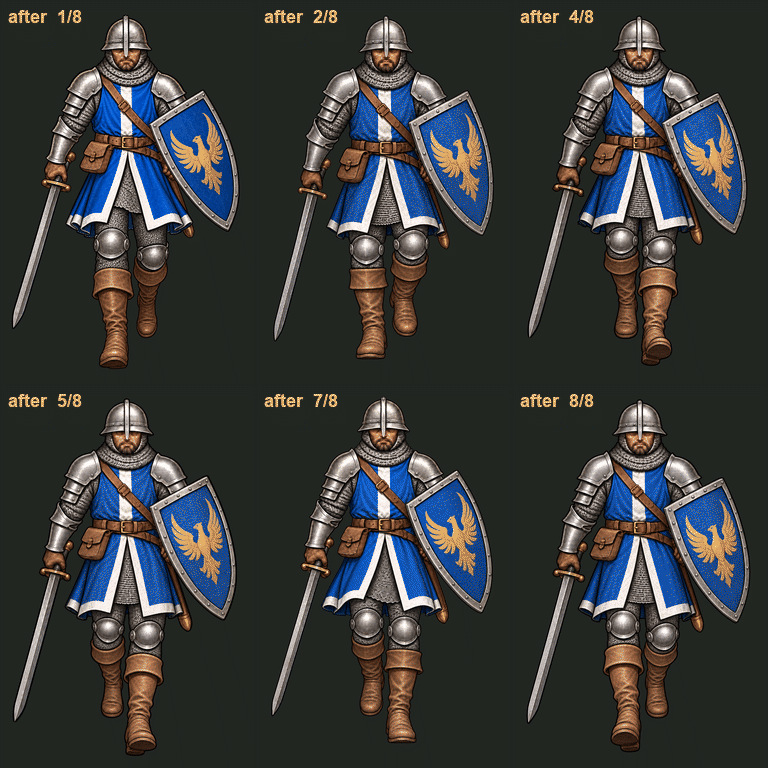
The Galean south walk cycle after a day of fixes: heel strike, dip, steady height and a sword that stays the same length