- Preview before acting. Every new setup or rule change runs as a dry run first: the bot shows exactly what it would do and changes nothing until the preview is approved.
- When in doubt, leave it for a person. Only routine mail that passes every check is cleared. Anything personal, urgent, security-related, suspicious or unclear stays unread and labeled for review.
- Nothing irreversible, nothing sent. The bot never deletes mail, never sends, replies or forwards, and trash or spam happens only with an explicit go-ahead for each message.
- Fix false alarms at the cause. When a check flags ordinary mail, the check is narrowed and a test is added, so the same mistake can't come back.
- Every action leaves a record. Whatever the bot does, or would have done in a preview, is written to an audit log.

How it works: Gmail Bot
For keeping an inbox down to the mail that actually needs a person, and catching the phishing and fraud attempts hidden among the rest.
Philosophy
The workflow
What it owns
- Sorting new mail into seven buckets: personal, security-sensitive, action-required, statement, transactional, newsletter/marketing, and uncertain.
- The fraud checks: spoofed sender names, lookalike domains, failed email authentication, sign-in codes nobody asked for, "urgent wire transfer" scams and dangerous attachments.
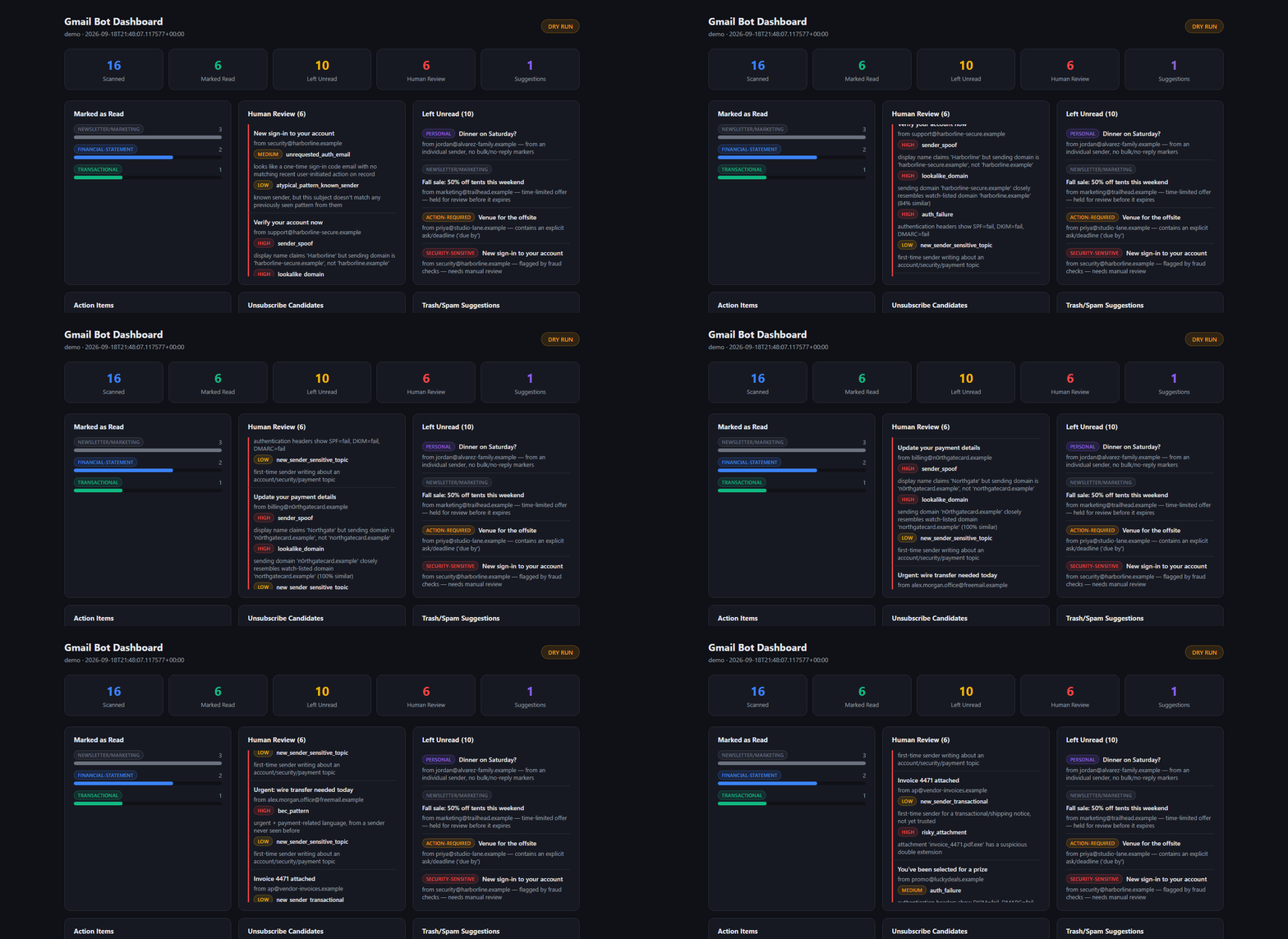
- The digest and dashboard for each run: what was cleared, what was left and why, the review panel with severity badges, action items and deadlines, unsubscribe options and upcoming renewals.
- A desktop alert when a trusted "delivered" email comes in, for parcels and groceries alike.
What it hands off
- Human review: every review-labeled message, every trash or spam suggestion, and every rule change.
- The Project Manager: studio standards and relayed requests.
- The Art Director: the bot's brand art and the demo GIFs.
Guardrails
- Never deletes mail permanently; trash is Gmail's recoverable trash, and only with an explicit go-ahead.
- Never sends, replies or forwards mail.
- Never clears personal, security-sensitive, action-required or uncertain mail, whatever the settings say.
- Never loads pages linked from an email; unsubscribing uses only the sender's official unsubscribe header.
- Never lets a suspicious "delivered" email raise an alert; fake delivery notices are a common scam.
- Screenshots of the bot come from an invented demo inbox, never from a real one.
At work
The review panel after a run over the demo inbox, scrolling through six messages the fraud checks held back: a sign-in notice nobody asked for, a lookalike of a bank asking to "verify your account", a spoofed "update your payment details" email, an "urgent wire transfer" request, an invoice with a disguised program attached, and a promo that failed email authentication.